Help & guide
How to use Drumolo — the rudiments, a learning path, and every tool.
Need a hand or want to report something? Tap the 💬 Feedback button at the top‑right of any page — questions, bugs and ideas all reach me there, and I read every one.
🥁 Have an electronic kit? Connecting it directly over USB or MIDI is where Drumolo gives you the most — play real pads with sticks, hand by hand, and every hit is graded against the line. See how →In about a minute
Quick start
You don’t need a drum kit. A laptop and the space bar are enough to begin — here’s the whole loop.
1 Pick a rudiment
Open the Trainer and choose one from the left list — start with Single Stroke Roll. The notation and sticking appear instantly.
2 Set a tempo & press Play
Use a slow BPM. The metronome counts you in and the playhead shows exactly where each note falls. Turn on a hit sound to hear the pattern.
3 Play along
Tap Space (either hand), the letter keys for left/right, or connect an e-kit. Watch your on-time %, last-hit grade and streak climb.
The biggest upgrade to your practice
Connect your electronic kit
Drumolo works fine with the space bar — but it comes alive when you plug a real e-kit straight in over USB or MIDI. Hitting actual pads with sticks, right hand on the right pad and left on the left, is the difference between tapping along and practising the instrument. Every hit is timed against the moving line, so you build real hands and real time, not rhythm-game reflexes.
1 · Use a supported browser
Web MIDI lives in Chrome or
Edge over the secure https site — that’s what lets the browser see your kit.
Safari and Firefox don’t expose Web MIDI yet.
2 · Plug in over USB or Bluetooth
Almost any class-compliant kit or MIDI pad works — Roland, Alesis, Yamaha, a Nektar/Akai pad, anything that speaks MIDI. Connect the cable or pair over Bluetooth, then press Connect kit.
3 · Calibrate once
A 🎯 Timing −/+ chip appears the moment a kit connects. Nudge your hits onto the line to cancel gear, USB and Bluetooth latency — it’s saved per device, so you only do it once.
Why it’s worth it
- Real sticking. With R/L labels on, the kit enforces which hand plays which note — you can’t fake a paradiddle on the space bar.
- Honest timing. Pad and MIDI latency is real; once calibrated, your Perfect/Good grades reflect your actual playing, not your keyboard.
- Dynamics & feel. Velocity comes through, so accents and ghost notes read the way you hit them.
- Record real takes. In the Metronome your kit performance records straight to a
.midyou can export.
Where it shines
- Trainer play-along — drill any rudiment at tempo with your own hands.
- Song mode — mute the drums and play the part on your kit against the tune.
- The Metronome — free-play metronome: load a backing track, watch your hits, and capture takes.
No kit yet? The keyboard hand-map below gets you surprisingly far — but a kit is the single biggest jump in value.
The foundation
The 40 rudiments, in four families
Every one of the 40 PAS rudiments is built from four ideas. Learn the four and the whole list stops looking like a wall of names.
Roll rudiments
FAMILY ISingles and doubles. The open (double-stroke) roll below is the engine of the buzz roll — let each stick bounce twice: R R L L.
Diddle rudiments
FAMILY IIA “diddle” is a double stroke woven into singles. The single paradiddle — R L R R · L R L L — accents the first note of each cell.
Flam rudiments
FAMILY IIIA flam is two notes played almost together: a quiet grace note a hair before the main note, so it lands “fat.” The small note whispers; the big note speaks.
Drag rudiments
FAMILY IVA drag (or ruff) leads the main note with two quick grace notes — a tiny bounced double that pulls you onto the beat.
A syllabus, not a wall
A learning path
Work down the ladder. Each stage builds the hands you need for the next — and every rudiment in it has a one-tap song that drills it (see Song mode).
Single strokes — the foundation
Single Stroke Roll · Four · Seven. Even, balanced hands. Go slow, keep on-time % green, and make both hands sound identical before you speed up.
Doubles & the rolls
Double Stroke Open Roll · Multiple Bounce · 5/7/9-stroke rolls. Let the second stroke bounce on its own. This unlocks the whole roll family.
Diddles & paradiddles
Single · Double · Triple Paradiddle · Paradiddle-diddle. Accent the first note of each cell so the hand-switches lock in.
Flams
Flam · Flam Accent · Flam Tap · Flamacue · Pataflafla. Keep the grace note soft and the main note strong — placement over power.
Drags & ratamacues
Drag · Single/Double Drag Tap · Lesson 25 · the Ratamacue family. Two whispered grace notes lead each beat. This is the polish on top.
How to practice any rudiment
- Notation on, tempo slow. Watch the playhead; match each note.
- Loop until it’s green. Keep on-time % high and the streak unbroken before moving on.
- Nudge the speed up. Use the speed trainer / tap tempo to add a few BPM at a time.
- Take it to a song. Hit 🎵 Songs and play the rudiment in a real tune at any tempo.
The main tool
The Trainer
Pick a rudiment, set a tempo, and play along with live notation and timing feedback. This is where most of your practice happens.
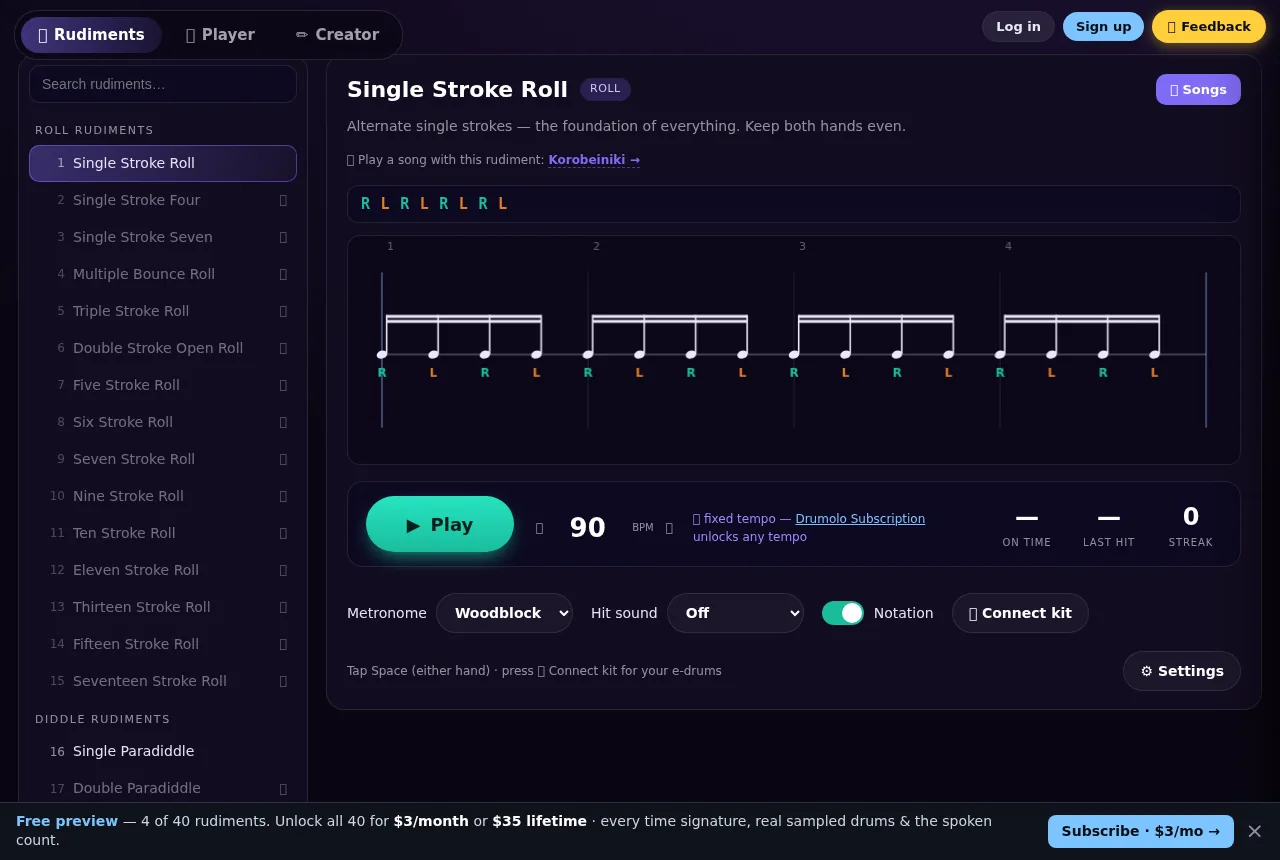
- Rudiment picker — search and pick from all 40, grouped by family.
- Live notation — the sticking and rhythm, with a moving playhead. On by default.
- Metronome & hit sounds — woodblock, cowbell, clave, rim… plus a separate instrument for your own hits, and subdivision ticks (¼ / 8th / 16th / 32nd).
- R/L labels & left-handed swap — enforce the right sticking, or flip it.
- Speed trainer & tap tempo — ramp the BPM gradually, or tap in a feel.
- Live stats — on-time %, last-hit grade (early/late) and a streak counter.
Play along to real music
Song mode
Every rudiment is mapped to a public-domain tune that drills it. Song mode scrolls the whole piece past a playhead and plays three tempo-locked layers off one clock.
- Open it from a rudiment’s “🎵 Play a song with this rudiment” link, or the 🎵 Songs button.
- Three layers, one tempo — 🎶 melody · 🥁 drums · 🔈 click. One BPM moves all three and re-anchors instantly.
- Mute the drums and play the part yourself against the tune and the metronome.
- Drummer count (“1 e & a”) and a framed, auto-scrolling sheet.
- Switch songs in place with the in-overlay 🥁 Rudiment picker; ← Rudiments returns.

Record & review
The Metronome
A do-it-all metronome and free-play surface: set a tempo, watch your hits scroll past bar lines (the “1” of every bar accented), and record a take you can scrub through and export as a real MIDI file.
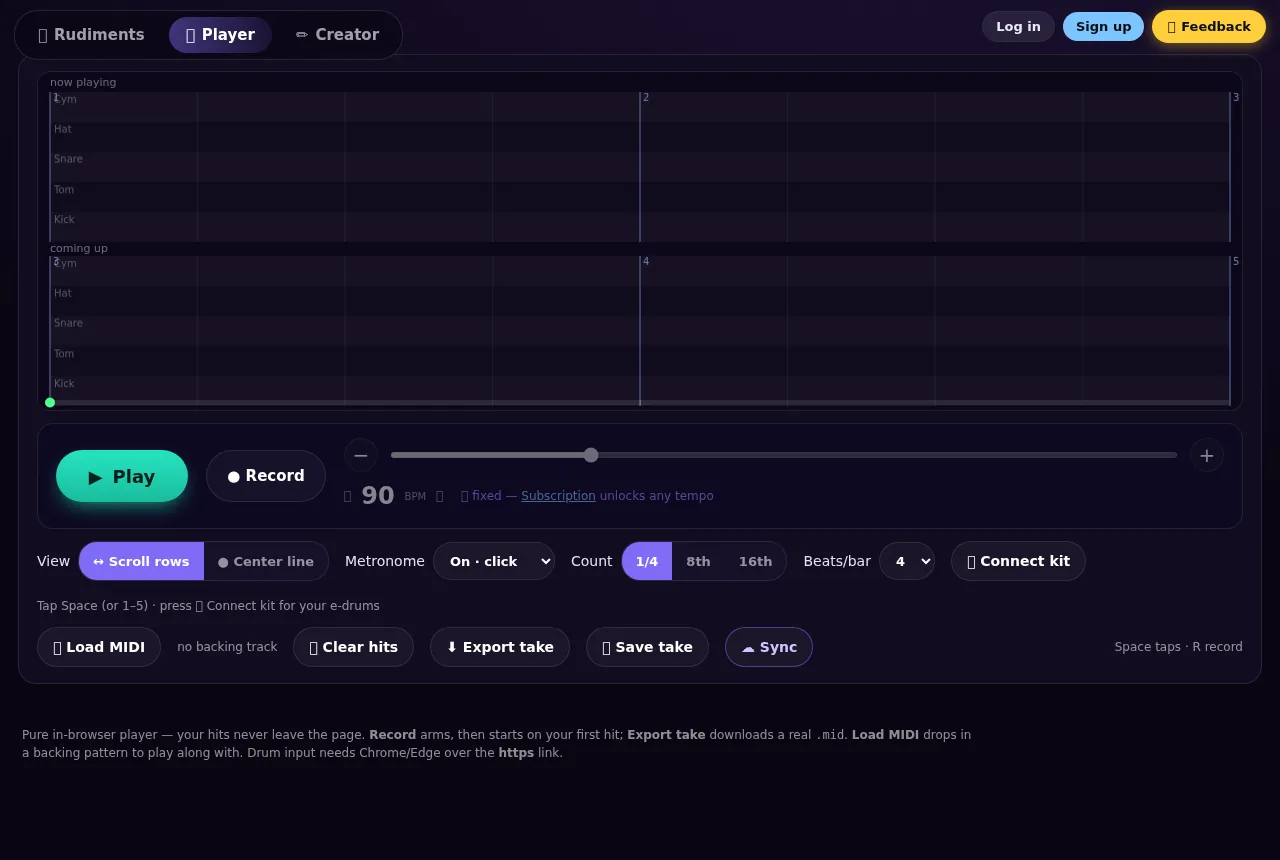
- Play your way — e-kit over Web MIDI, or tap Space / keys 1–5.
- Load a
.midbacking track and play along to it. - Record a take, then pause → review: an overview bar shows your place in the whole take and you scrub back over what you played.
- Continue from the end to append, or erase and restart.
- Export a real
.mid— or save & sync it Pro.
The free Metronome runs at a fixed 90 BPM; Drumolo Pro unlocks any tempo.
Build a beat
The Creator
A little MIDI sketchpad. Place and drag notes on a bar grid, hear it loop, and export a standard MIDI file you can open in any DAW.
- Click to add, drag to move — lanes top to bottom are Cymbal · Hi-hat · Snare · Tom · Kick (General-MIDI map).
- Shape the grid — beats per bar, number of bars, and a snap of ¼ / 8th / 16th / 32nd / triplet / free.
- Preset beats to start from, and a tempo control.
- Export
.mid— or save & sync Pro.

How feedback works
Timing & scoring
Drumolo grades every hit honestly. The window that counts as “in time” scales with the spacing between notes — a 20 ms slip is fine on a slow line but a real error on a fast one.
Honest accuracy
It counts notes you missed and stray taps — not just “of the times I tapped, how many were green.” Scoring starts only once you begin playing.
Streaks
Your streak is the run of consecutive Perfect/Good hits. One miss or stray resets it — a simple nudge toward consistency over bursts.
No kit needed
Keyboard & hands
The keyboard is split down the middle: the left half is your left hand, the right half is your right. Space is a generic tap for either hand.
Left hand ●
Left-half letters (q w e r t · a s d f g · z x c v b), the ← arrow, and numpad 1 / 4 / 7.
Right hand ●
Right-half letters (y u i o p · h j k l · n m), the → arrow, and numpad 3 / 6 / 9.
Free to start
Free & Drumolo Pro
The free build is a real window into the product — same high-quality sampled drums and all. Drumolo Pro opens the whole thing — all 40 rudiments, every tempo, the speed trainer and sync.
Free
- 19 of 40 rudiments to learn on
- Basic 4/4 at a fixed 90 BPM
- Real sampled drums, difficulty levels & a practice-goal timer
- Notation, scoring, the Metronome & the Creator
Drumolo Pro
- All 40 rudiments and every time signature
- Any tempo in the Trainer, Song mode, Metronome & Creator
- The speed trainer — auto-ramps your tempo as you nail each pass
- Progress sync, saved routines & stats across devices
I'm rebuilding Drumolo — Pro isn't available yet.
Quick answers
FAQ
Do I need a drum kit?
No. You can practice everything with the space bar and the letter keys. An e-kit makes it more realistic, but it’s entirely optional.
Which browsers work best?
Any modern browser runs the Trainer, Metronome and Creator. To play a connected e-kit you’ll need Chrome or Edge over the secure site, because that’s where Web MIDI is available.
Is my playing uploaded anywhere?
No. The trainer is pure client-side — your hits, takes and settings live in your browser. With Drumolo Pro you can choose to save and sync routines to your account; nothing leaves the device otherwise.
Why are the songs all old/public-domain?
Licensing. A famous recording needs separate master and publishing licenses, so Song mode uses public-domain music — rudimental solos, marches and classical themes — that’s free and legal to learn from.
What does Drumolo Pro unlock?
All 40 rudiments, every time signature, any tempo (including on songs and the Metronome), the speed trainer, and progress sync / saved routines / stats across your devices.
Can I export what I make?
Yes — both the Metronome and the Creator export a standard .mid file you can open in any
DAW or notation app, on the free tier too.
Ready to play?
Open the Trainer, pick the Single Stroke Roll, and follow the loop from the top of this page.